Audio
MP3 at 128, 192 or 320 kbps: Can You Hear the Difference?
What MP3 bitrate should you choose? Compare file sizes, what blind listening tests found, and why converting a low-quality source to 320 kbps doesn't help.
By Save Downloads Team Published 6 min read How we write and test
When you save audio from a video, you’re usually asked to pick a bitrate. Bigger sounds better, but it also takes more space, and past a certain point you’re paying for detail you can’t hear. Here’s what the numbers mean and how to choose.
What kbps means
kbps is kilobits per second: how much data is used to describe each second of sound. More bits allow a more accurate copy of the original. MP3 throws away sounds the human ear is least likely to notice (very quiet sounds next to loud ones, extreme high frequencies). At lower bitrates it has to throw away more, and eventually you hear it as swishy cymbals, a dull top end, or “underwater” artefacts.
File sizes at each bitrate
The maths is the same as for video: kbps × seconds ÷ 8 ÷ 1000 = MB.
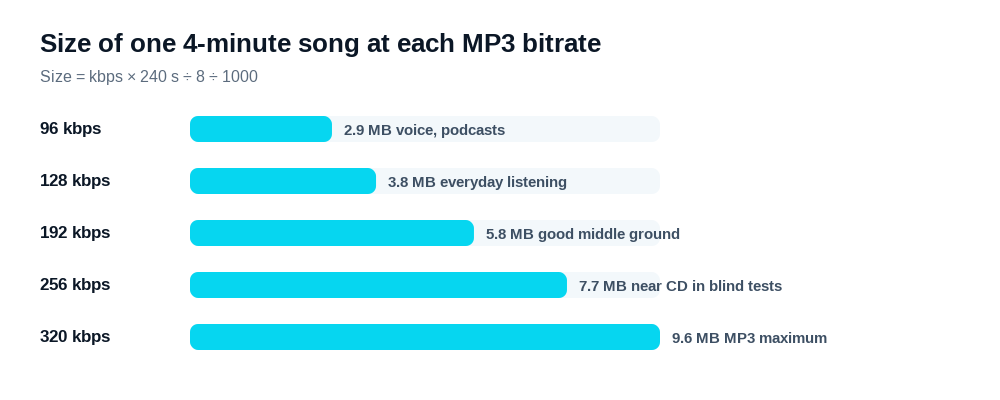
| Bitrate | Per minute | 4-minute song | 1,000 songs |
|---|---|---|---|
| 96 kbps | 0.72 MB | 2.9 MB | ~2.9 GB |
| 128 kbps | 0.96 MB | 3.8 MB | ~3.8 GB |
| 192 kbps | 1.44 MB | 5.8 MB | ~5.8 GB |
| 256 kbps | 1.92 MB | 7.7 MB | ~7.7 GB |
| 320 kbps | 2.4 MB | 9.6 MB | ~9.6 GB |
Compare that with keeping the music video: a 4-minute 720p video is around 75 MB. Saving music as audio is one of the easiest ways to keep a big library on a phone.
Can people really hear the difference?
Listening tests over the years point to the same pattern:
- 128 kbps is where differences start to be audible for attentive listeners on good equipment, particularly on cymbals, applause, and dense rock or orchestral music.
- Around 192 kbps and above, most listeners in blind tests struggle to reliably pick the MP3 from the original on typical headphones.
- 256 to 320 kbps is generally considered transparent for nearly everyone; it’s the safe choice for people with high-end headphones and the space to spare.
Your setup matters more than the number. On a phone speaker, a Bluetooth speaker in the kitchen, or in a car with road noise, 128 kbps is usually fine. Bluetooth itself re-compresses audio on the way to your earbuds (SBC or AAC on most phones), which limits what you can hear anyway.
The mistake that wastes the most space
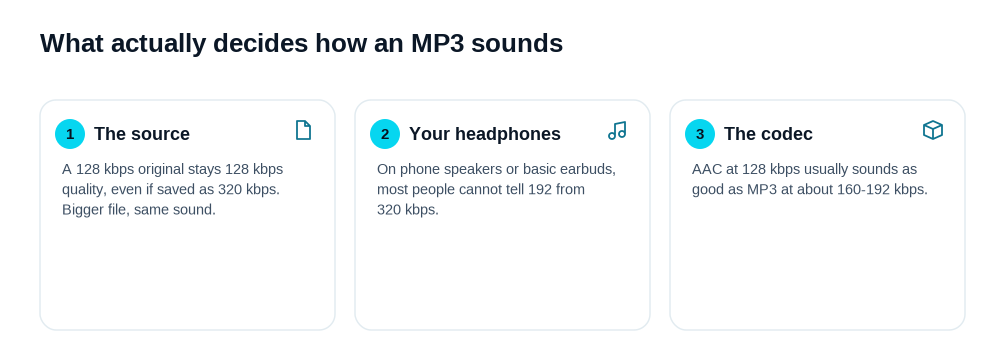
You can’t add quality by raising the bitrate. If the source was 128 kbps, converting it to 320 kbps produces a file 2.5 times bigger that sounds the same, because the detail was already thrown away. This matters when saving audio from online videos. Most platforms stream sound at roughly 128 to 160 kbps in AAC or Opus. Saving that as a 320 kbps MP3 doesn’t make it sound better; it just makes it bigger.
A sensible rule: choose an MP3 bitrate a little above the source’s quality to avoid adding new losses in the conversion, but don’t go far beyond it. For audio taken from a typical online video, 192 kbps is plenty.
MP3 vs AAC (M4A)
AAC, often in files ending .m4a, is a newer codec designed to replace MP3. At the same bitrate it generally sounds better; AAC at 128 kbps is often compared to MP3 at about 160 to 192 kbps. Every modern phone, computer and car stereo plays it.
MP3’s advantage is universal compatibility, including very old car stereos, cheap MP3 players and some editing software. If you’re unsure where the file will end up, MP3 is the safe choice. Our MP3 converter saves audio as MP3 for exactly that reason.
Quick recommendations
| You listen on | Choose |
|---|---|
| Phone speaker, basic earbuds, car | 128 kbps |
| Everyday headphones, a mix of uses | 192 kbps |
| Good wired headphones, quiet room | 256 to 320 kbps |
| Podcasts, lectures, audiobooks | 64 to 96 kbps (mono is fine) |
Summary
128 kbps is about 1 MB per minute, 320 kbps about 2.4 MB. Most people can’t hear a difference above about 192 kbps on everyday equipment, and converting a low-quality source to 320 kbps adds size, not quality. Pick 192 kbps as a default and adjust for your headphones.
Sources and further reading
Frequently asked questions
Is 320 kbps noticeably better than 128 kbps?
On good headphones in a quiet room, many people can hear a difference on complex music such as cymbals and orchestras. On phone speakers or basic earbuds, most people can't tell 192 from 320 kbps.
What MP3 bitrate should I use?
192 kbps is a sensible default for music: small files and quality most people can't distinguish from higher rates. Use 128 kbps for speech and podcasts, and 256 or 320 kbps if you listen on good headphones and space isn't a concern.
Does converting to 320 kbps improve quality?
No. If the source audio was 128 kbps, saving it as 320 kbps only makes the file bigger. Quality can't be added back once it's been removed.
How big is an MP3 file per minute?
About 0.96 MB per minute at 128 kbps, 1.44 MB at 192 kbps and 2.4 MB at 320 kbps.
Save videos, photos and audio on Android
Save Downloads is free, needs no account, and shows the real file size before every download.
Free · v1.0.3.1 · 97.9 MB · Android 7.0 or newer · How to install