Troubleshooting
Downloaded Video Has No Sound? 4 Causes and How to Fix Each
A saved video plays but stays silent? Find out whether it's the media volume, the player, a muted original or a missing audio track, and fix it in minutes.
By Save Downloads Team Published 7 min read How we write and test
You tap play, the picture moves, and nothing comes out of the speaker. Before you delete the file and start over, it helps to know there are only four real reasons a saved video is silent, and each one has a quick test. We get this question more than any other on our support email, so this guide follows the order we use when we troubleshoot it ourselves.
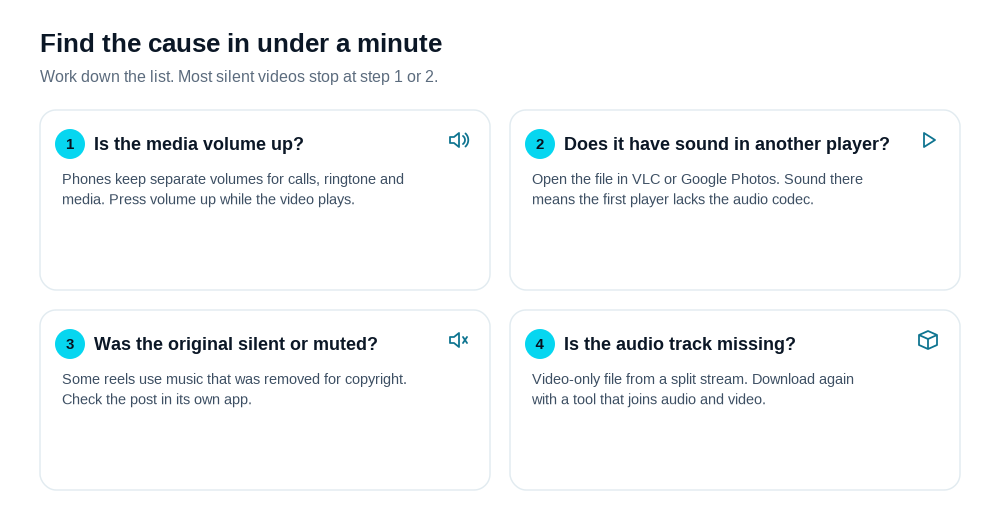
Step 1: Rule out the media volume (10 seconds)
Android keeps separate volume levels for ringtone, notifications, alarms and media. It’s easy to have the ringer up and media at zero, especially after watching something in a quiet place.
Start the video, then press the volume-up button. The slider that appears should say media (on most phones a music-note icon). If it shows the ringer slider instead, tap the small arrow or the three dots next to it to reveal all volume bars and raise media.
Also check:
- Bluetooth. If earbuds connected in your pocket, the sound is going there. Pull down the quick settings and turn Bluetooth off for a moment.
- Do Not Disturb. On some Samsung and Xiaomi builds, a strict Do Not Disturb mode also mutes media.
- The player’s own mute button. Many players, including Instagram-style viewers, start muted until you tap the speaker icon.
If you hear sound now, you’re done. If not, move on.
Step 2: Try a second player
Open the same file in a different app. Google Photos and the free VLC for Android are good choices, because VLC brings its own decoders instead of relying on the phone’s.
- Sound in VLC but not in your gallery: the file is fine. Your gallery app doesn’t understand the audio codec. This happens with videos whose sound is in AC-3 (Dolby Digital), E-AC-3 or DTS, which are common in movies and TV recordings but not universally supported by phone players. Android’s list of guaranteed formats includes AAC, MP3, Opus and Vorbis, not the Dolby codecs, so support for those depends on the phone maker.
- Silent in every player: the file itself has no usable sound. Go to step 3.
Step 3: Check whether the original was silent
This sounds obvious, but it catches people out. Open the post in its own app with the sound on.
- Reels and short videos sometimes have their music removed after posting because of a copyright claim. The app may show “audio unavailable” while the picture stays up. Any copy you save afterwards will be silent too.
- Some clips are just silent: screen recordings, GIF-style loops and many posts on X that were converted from GIFs.
- The creator muted it to put the music back in later and never did.
If the original is silent, there’s nothing to fix. If the original has sound and your copy doesn’t, it’s step 4.
Step 4: The audio track is missing (the most common cause)
Here is what’s going on behind the scenes. Many video sites no longer send one file with picture and sound together. To let the player switch quality smoothly as your connection changes, they send the picture as one stream and the sound as another. The technique has a name, MPEG-DASH, and similar split-stream setups are used by most large platforms for their higher qualities.
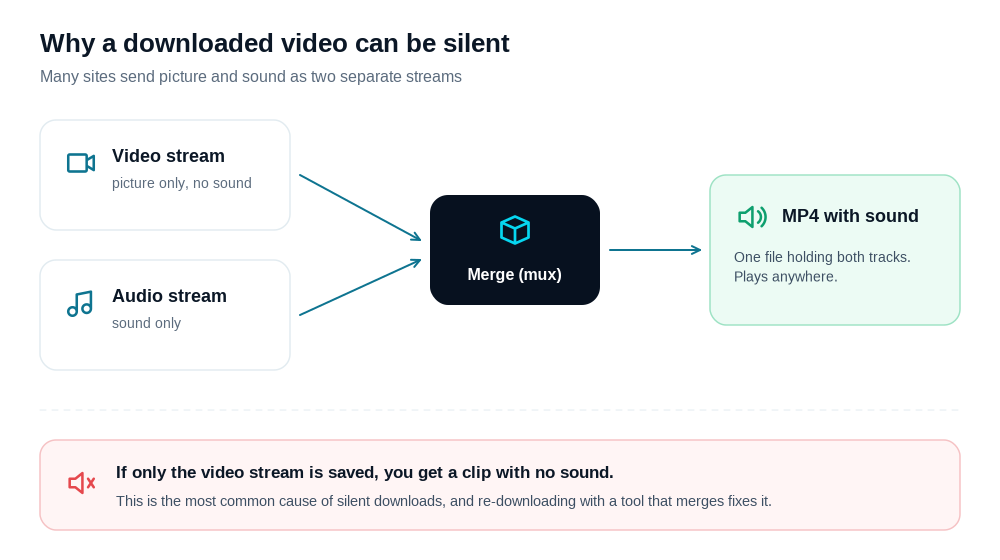
When you watch on the site, the player fetches both streams and plays them in sync. A downloader that grabs only the video stream gives you a perfectly sharp clip with no sound at all. Two things point to this cause:
- The file is silent in every player, including VLC.
- The silent copy came from a “high quality” option (720p or above), while lower qualities from the same tool had sound. Lower qualities are more often served as a single combined file.
How to fix it
You can’t recover sound that was never downloaded. The fix is to download again with a tool that fetches both streams and merges them. The merge step is called muxing: it puts both tracks into one container, normally MP4, without re-encoding, so there’s no quality loss and it only takes a few seconds even for a long video.
In Save Downloads this happens automatically. When a site offers separate streams, the app downloads the picture and the best matching sound in parallel, joins them, and then checks that the finished MP4 really contains an audio track before it marks the download as complete. If the check fails, the download shows as failed instead of leaving a silent file in your gallery. We added that check after early testers reported exactly this problem.
If you already have the audio as a separate file (some desktop tools save .m4a next to the video), any muxing tool can join the two. On a computer, the free FFmpeg command ffmpeg -i video.mp4 -i audio.m4a -c copy output.mp4 does it in seconds without re-encoding.
A quick reference table
| What you notice | Likely cause | Fix |
|---|---|---|
| No sound anywhere on the phone | Media volume at zero or Bluetooth connected | Raise media volume, check Bluetooth |
| Sound in VLC, silent in gallery | Unsupported audio codec (AC-3, DTS) | Use VLC or convert audio to AAC |
| Original post is also silent | Music removed or clip never had sound | Nothing to fix |
| Silent in every player, original has sound | Video-only download, audio track missing | Re-download with a tool that merges audio |
| Sound cuts out halfway | Download stopped early and file was “repaired” | Delete and download again on a stable connection |
What about sound that’s out of sync?
A related complaint is sound that runs a second ahead of or behind the picture. In downloaded files this usually comes from a merge that started from a slightly different point in each stream, or from a variable-frame-rate screen recording. VLC lets you shift the audio while watching (Audio > Synchronization). For a permanent fix, download again; a fresh merge normally lines up correctly.
The short version
Check the media volume first, then try VLC. If the original has sound and your copy is silent everywhere, the download saved only the picture stream. Download it again with an app that joins the audio and video tracks, and confirm with a quick play before you delete the original link.
Sources and further reading
Frequently asked questions
Why does my downloaded video have no sound but the original does?
Most often the file contains only the video track. Many sites stream picture and sound separately, and a tool that saves just the picture stream gives you a silent clip. Download it again with an app that joins both tracks.
Can I add the sound back to a silent video file?
Only if you also have the audio track as a separate file. Without the audio data there is nothing to restore, so re-downloading is the practical fix.
My video has sound in VLC but not in the gallery. Why?
The gallery app can't decode the audio codec used in that file, often AC-3, E-AC-3 or DTS. VLC carries its own decoders. Keep using VLC, or convert the audio to AAC.
Does Save Downloads check for sound?
Yes. When a site sends video and audio separately, the app downloads both, joins them into one MP4 and checks the finished file has an audio track before marking it done.
Save videos, photos and audio on Android
Save Downloads is free, needs no account, and shows the real file size before every download.
Free · v1.0.3.1 · 97.9 MB · Android 7.0 or newer · How to install