Formats & quality
MP4 vs MKV vs WebM: Which Video Format Should You Keep?
MP4, MKV and WebM are containers, not quality levels. Learn what each holds, which devices play them, and which format to keep on your phone.
By Save Downloads Team Published 7 min read How we write and test
Download a video and you might get an .mp4, an .mkv or a .webm. People often assume one is “higher quality” than the others. It isn’t, and understanding why makes it much easier to choose.
Containers and codecs: the box and what’s inside
A video file has two layers:
- The codec is how the picture and sound are compressed: H.264 (AVC), H.265 (HEVC), VP9 and AV1 for video; AAC, MP3, Opus and AC-3 for audio. The codec decides quality and file size.
- The container is the box that holds those compressed tracks together, along with subtitles, chapter markers and information such as the title. MP4, MKV and WebM are containers.
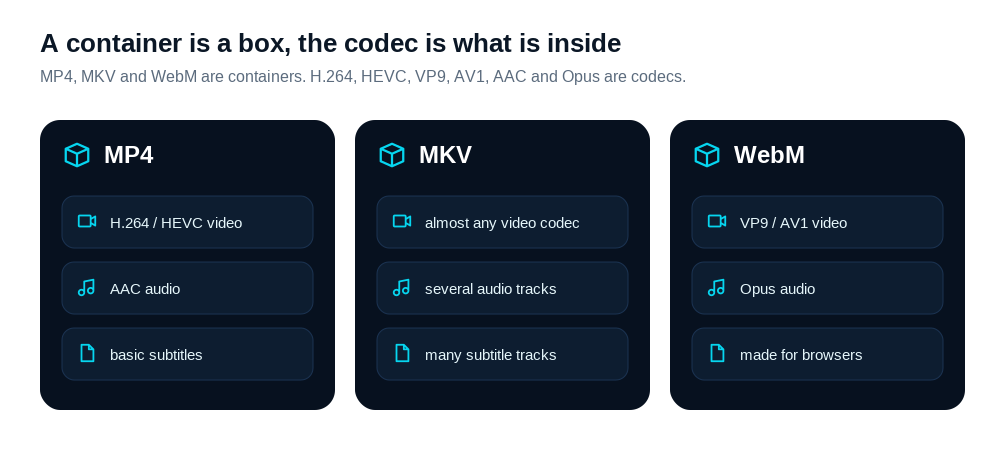
So “MKV vs MP4” is mostly a question of which box is more convenient, not which picture is better. An H.264 video at 5 Mbps looks the same in either.
MP4: the one that plays everywhere
MP4 (formally MPEG-4 Part 14) is the default for phones, cameras, social media and messaging apps. It normally holds H.264 or HEVC video with AAC audio.
- Good: plays on virtually everything: Android, iPhone, Windows, Mac, smart TVs, game consoles, browsers, WhatsApp, video editors.
- Limits: less flexible with unusual codecs and multiple subtitle formats.
- Use it when: you’ll share the file, edit it, or watch it on more than one device.
MKV: the flexible one
MKV (Matroska) is an open container that accepts almost any codec and any number of tracks: several audio languages, a dozen subtitle tracks, chapters, cover art. That’s why it’s popular for films and series archives.
- Good: keeps everything in one file; excellent for collections with multiple languages.
- Limits: iPhones don’t play it in the built-in apps, WhatsApp won’t send it as a playable video, and many video editors won’t import it. Android plays MKV, but sound can be missing when the audio is DTS or Dolby (AC-3/E-AC-3), which not every phone decodes.
- Use it when: you’re archiving on a computer or watching through VLC, Kodi or a media server.
WebM: the web one
WebM was created by Google for the web. It’s based on Matroska but only allows royalty-free codecs: VP8, VP9 or AV1 video with Vorbis or Opus audio. Many sites stream in VP9 or AV1, which is why downloads sometimes arrive as WebM.
- Good: efficient modern codecs mean smaller files for the same quality, especially with AV1.
- Limits: less support outside browsers and Android. Older iPhones and some TVs and editors struggle. AV1 can stutter on older or budget phones that lack a hardware decoder.
- Use it when: you’re watching in a browser or on a recent Android phone.
Will it play? A quick compatibility check
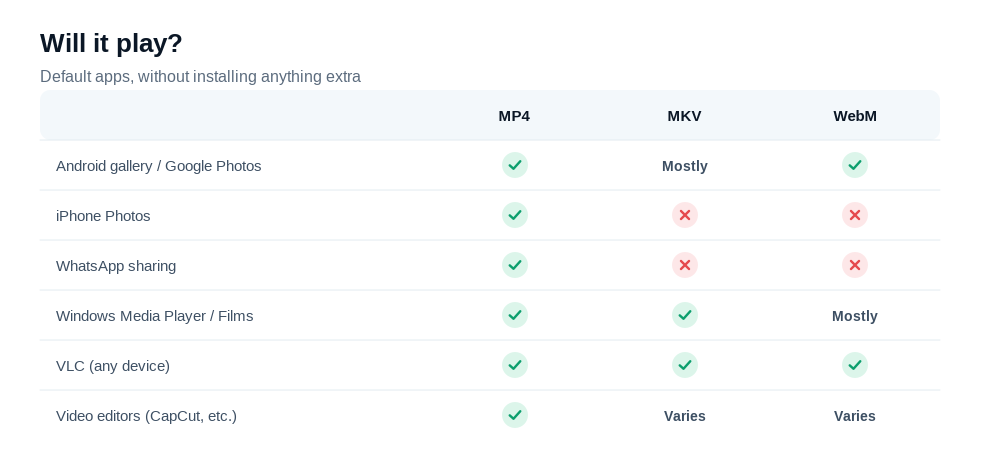
Which should you keep on your phone?
For most people the answer is simple: MP4 with H.264 video and AAC audio. It costs a little more space than VP9 or AV1, but you’ll never wonder whether it’ll play, share or edit.
That’s why Save Downloads saves videos as MP4. When a site sends the picture and sound as separate streams, the app joins them into an MP4 so the file opens in your gallery, plays in WhatsApp and imports into editors. If you only need the sound, the MP3 converter saves just the audio, which is a fraction of the size; our guide to MP3 bitrates explains which quality to choose.
Converting between formats without losing quality
There are two very different ways to change a format:
- Remuxing copies the existing tracks into a new container. No re-encoding, no quality loss, and it takes seconds. It only works when the codecs inside are allowed in the target container (for example, H.264 + AAC from MKV into MP4).
- Re-encoding decompresses and compresses the video again. Needed when the codec isn’t supported (VP9 into a strict MP4 workflow, or DTS audio into AAC). It takes longer and always loses a little quality.
On a computer, the free FFmpeg tool remuxes with ffmpeg -i input.mkv -c copy output.mp4. If that command gives an error about codecs, the file needs re-encoding instead. Free apps such as HandBrake do that with a simple interface.
Common questions about file extensions
What about .mov, .avi, .3gp? MOV is Apple’s container, close to MP4, and plays widely. AVI is old and inefficient. 3GP was for early mobile phones. If you have a choice, prefer MP4.
Why does a video say .mp4 but won’t play? The extension is only a label. A file renamed from .mkv to .mp4 is still an MKV inside. A player like VLC, or a tool like MediaInfo, shows what the file really contains.
Summary
MP4, MKV and WebM are containers; quality comes from the codec and bitrate inside. Keep MP4 (H.264 + AAC) for anything you’ll share or play on different devices, MKV for multi-language archives on a computer, and WebM when you’re watching in a browser or on a recent Android phone.
Sources and further reading
Frequently asked questions
Is MKV better quality than MP4?
Not by itself. Quality depends on the codec and bitrate inside, not the container. The same H.264 video in MKV and MP4 looks identical. MKV just allows more tracks and more codec types.
Can Android play MKV and WebM?
Android supports WebM and Matroska playback as part of the platform, so most phones play them. Problems usually come from the audio codec inside an MKV, such as DTS or AC-3. VLC plays almost anything.
How do I convert MKV to MP4 without losing quality?
If the codecs inside are MP4-compatible (H.264 or HEVC video, AAC audio), you can 'remux': copy the tracks into an MP4 container without re-encoding. It takes seconds and there's no quality loss.
Which format should I use to share a video?
MP4 with H.264 video and AAC audio. It plays on every phone, computer, TV and messaging app.
Save videos, photos and audio on Android
Save Downloads is free, needs no account, and shows the real file size before every download.
Free · v1.0.3.1 · 97.9 MB · Android 7.0 or newer · How to install