Android basics
Where Do Downloaded Files Go on Android? How to Find Any Download
Can't find a file you just downloaded? Here is where Android, Chrome, WhatsApp and download apps save files, and the fastest way to find each one.
By Save Downloads Team Published 6 min read How we write and test
“It said download complete, so where is it?” Android doesn’t have one single place for downloads. Each app chooses a folder, and since Android 10 apps have been steered towards a few shared folders by a system called scoped storage. Once you know those folders, finding anything takes seconds.
The quickest method: open the Files app
Every Android phone has a file manager. It might be called Files (Files by Google, on Pixel, Motorola, Nokia and many others), My Files (Samsung) or File Manager (Xiaomi, Redmi, POCO).
- Open it and tap Downloads (sometimes under Categories or Browse).
- Files are listed newest first. The one you just saved should be at the top.
- If not, use the search bar and type part of the file name, or switch to the Videos or Images category, which gathers files from every folder.
That covers most cases. The rest of this article explains where specific apps put things, for when a file isn’t in Downloads.
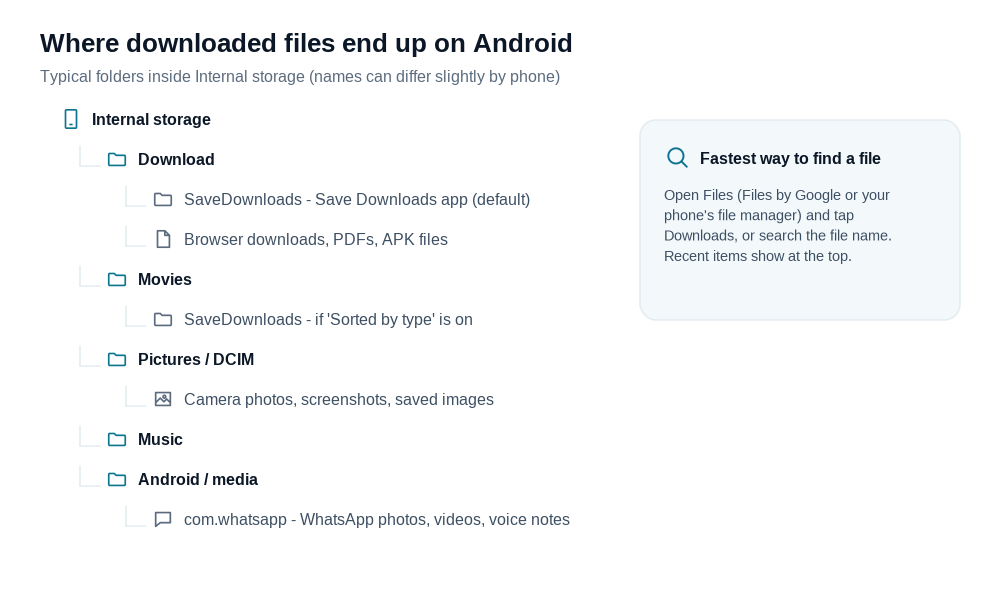
Where common apps save files
| App | Default location | Notes |
|---|---|---|
| Chrome, Samsung Internet | Internal storage > Download | Chrome can ask each time (Settings > Downloads) |
| Gmail and other email attachments | Download | Only after you tap the download icon on the attachment |
| Android > media > com.whatsapp > WhatsApp > Media | Separate folders for Images, Video, Documents, Voice Notes | |
| Telegram | Download > Telegram, or Android > media | Depends on version and the “Save to gallery” setting |
| Camera | DCIM > Camera | Screenshots go to Pictures > Screenshots or DCIM > Screenshots |
| Save Downloads | Download > SaveDownloads | Optional “Sorted by type” uses Movies, Music, Pictures |
Why WhatsApp files are buried so deep
Before Android 11, WhatsApp kept everything in a top-level WhatsApp folder. Scoped storage pushed apps to keep their own files inside Android/media/<app name>, so on current phones WhatsApp’s media sits at Android/media/com.whatsapp/WhatsApp/Media. Photos and videos you receive still appear in the gallery, because WhatsApp marks them as shared media. Statuses are different, and we explain that in where WhatsApp statuses are stored.
Where Save Downloads puts your files
We tested this on a Redmi 14C running the current app version. Out of the box, every finished download goes to Internal storage > Download > SaveDownloads, whether it’s a video, an MP3 or a photo. One folder keeps things easy to find and easy to back up.
If you prefer the phone’s standard folders, open Settings > Download settings in the app and choose Sorted by type. Then videos go to Movies/SaveDownloads, music to Music/SaveDownloads and photos to Pictures/SaveDownloads. The same sheet lets you limit how many downloads run at once and hold downloads until you’re on Wi-Fi. Our download settings guide shows each option with screenshots.
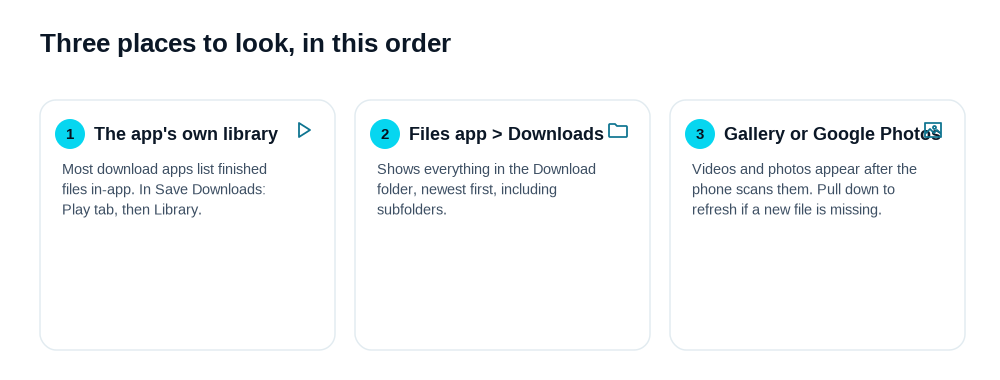
The app also lists everything in its own Play tab, under Library, so you rarely need a file manager at all.
“It’s in the folder, but not in my gallery”
The gallery doesn’t scan the whole phone constantly. Android’s media scanner adds new files to its index, and gallery apps read that index. Sometimes a new file takes a moment to appear. Try these in order:
- Close and reopen the gallery app, or pull down to refresh in Google Photos.
- Check for a
.nomediafile in the folder (turn on “show hidden files” in the file manager). That empty file tells every gallery app to skip the folder. It’s useful for hiding things, and annoying when it ends up somewhere it shouldn’t. - Restart the phone. A reboot triggers a fresh scan.
- Check the file actually finished. An incomplete download may have a temporary name ending in
.part,.tmpor.crdownload, and galleries ignore those.
Downloads on an SD card
If your phone has a memory card, some apps let you save there. Since Android 4.4, apps can’t write freely to an SD card; they either use their own folder under Android/data on the card or ask you to choose a location. If you picked the card in Chrome, look for a Download folder at the top of the SD card in your file manager, not in internal storage.
Deleting downloads you no longer need
The Downloads folder quietly grows. Installer files (.apk), PDFs you read once and duplicate videos can add up to gigabytes. In Files by Google, the Clean tab suggests old downloads to remove. Sorting the Downloads folder by size (tap the sort icon) is the fastest manual check. Save Downloads’ built-in Cleaner also finds leftover APK files and large files, and shows everything before deleting.
Summary
Open your Files app and tap Downloads first. If the file isn’t there, check the folder the app uses (WhatsApp under Android/media, the camera under DCIM, Save Downloads under Download/SaveDownloads). If a file is in the folder but missing from the gallery, reopen the gallery, look for a .nomedia file, and make sure the download really finished.
Sources and further reading
Frequently asked questions
Where is the Downloads folder on Android?
In Internal storage > Download. Open the Files app (Files by Google, My Files on Samsung, or File Manager on Xiaomi) and tap Downloads to see it sorted by date.
Why doesn't my downloaded video show in the gallery?
The gallery only lists files after Android's media scanner indexes them, which can take a moment. Restart the gallery app. If the folder contains a file named .nomedia, the gallery ignores that folder entirely.
Where does Save Downloads save videos?
By default in Internal storage > Download > SaveDownloads. In Settings > Download settings you can switch to 'Sorted by type', which puts videos in Movies, music in Music and photos in Pictures, each in a SaveDownloads folder.
Can I change where Chrome saves files?
Yes. In Chrome open Settings > Downloads and turn on 'Ask where to save files', then pick a folder or SD card each time.
Save videos, photos and audio on Android
Save Downloads is free, needs no account, and shows the real file size before every download.
Free · v1.0.3.1 · 97.9 MB · Android 7.0 or newer · How to install