Troubleshooting
Why Downloads Stop When You Lock Your Phone (and How to Fix It)
Downloads stop when the screen turns off? Battery savers on Xiaomi, Samsung, Oppo and Vivo close background apps. Here are the exact settings to change.
By Save Downloads Team Published 7 min read How we write and test
You start a big download, lock the phone, and come back to find it stuck at 37 percent or marked as failed. The download app usually isn’t broken. The phone decided to save battery by stopping it. This is one of the most common problems we deal with, and our own test phone, a Redmi 14C, is one of the stricter ones.
What’s actually happening
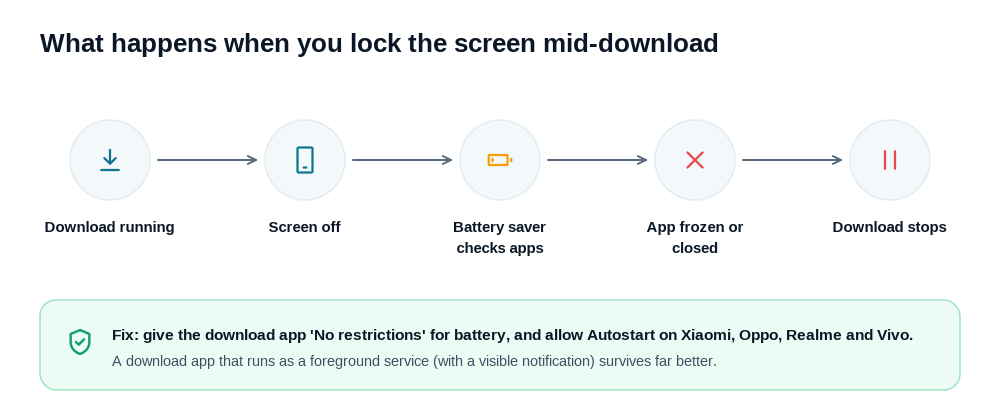
Stock Android already has battery-saving rules. Doze, added in Android 6.0, limits network access and background work when the phone has been still with the screen off for a while. App Standby Buckets (Android 9) restrict apps you don’t open often.
On top of that, many phone makers add their own, much stricter layers. Xiaomi, Oppo, Realme, Vivo, Huawei and, to a lesser degree, Samsung close or freeze background apps to make battery life look better in reviews. The independent site Don’t kill my app! tracks this brand by brand, and Xiaomi has long sat near the top of its list.
Why some apps survive and others don’t
Android gives apps a proper way to do long jobs: a foreground service. The app shows a notification you can see (“Downloading 2 files, 45%”), and in return the system treats it as something you’re actively using. Apps that skip this and try to download silently in the background get killed first.
When we built the download engine in Save Downloads we used a foreground service for exactly this reason, saved progress in small chunks so a download can continue from where it stopped instead of starting again, and added automatic resume after the phone restarts. Even so, on Xiaomi’s strictest settings, the battery manager can still step in during very long downloads. The settings below fix that for any app.
The settings to change, by brand
The general idea is the same everywhere: tell the battery manager to leave the download app alone.
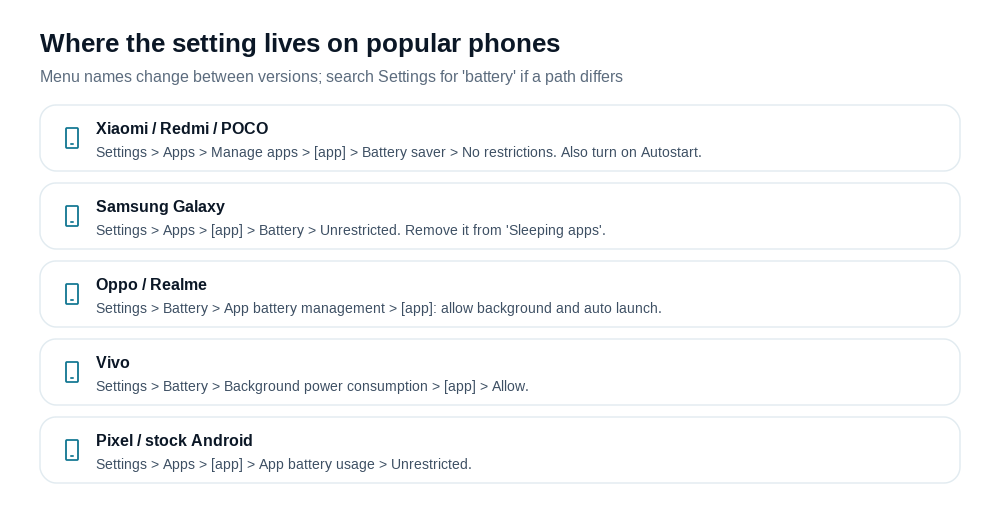
Xiaomi, Redmi and POCO (MIUI and HyperOS)
Xiaomi needs the most attention.
- Battery saver: Settings > Apps > Manage apps > [app] > Battery saver > No restrictions.
- Autostart: on the same app page, turn on Autostart. This lets the app restart itself to resume work.
- Lock it in recents: open the recent apps screen, long-press the app (or pull its card down) and tap the lock icon. Locked apps aren’t cleared when you tap “clear all”.
On HyperOS the battery option may be called Background settings or Battery usage, but it’s on the same app info page.
Samsung Galaxy (One UI)
- Settings > Apps > [app] > Battery > Unrestricted.
- Settings > Battery > Background usage limits: make sure the app isn’t in Sleeping apps or Deep sleeping apps. If it is, remove it.
- Optionally add it to Never sleeping apps.
Oppo and Realme (ColorOS / Realme UI)
- Settings > Battery > App battery management (or More settings > Optimise battery use) > [app].
- Allow background activity and auto launch.
Vivo (Funtouch OS / OriginOS)
- Settings > Battery > Background power consumption management > [app] > Allow.
- In i Manager or Settings > Apps, allow Autostart if offered.
Pixel, Motorola, Nokia (near-stock Android)
Settings > Apps > [app] > App battery usage > Unrestricted. Stock Android rarely kills apps that run a foreground service, so this is mostly needed for apps that don’t.
Other things that pause downloads
If the battery settings are fine and downloads still stop, check these:
- Wi-Fi only option. Many download apps can hold downloads until you’re on Wi-Fi. In Save Downloads it’s in Settings > Download settings > Download on Wi-Fi only. When it’s on and you leave Wi-Fi, downloads wait rather than fail.
- Wi-Fi sleeps with the screen. Some phones turn Wi-Fi off when the screen locks. Look for Keep Wi-Fi on during sleep in advanced Wi-Fi settings (not every phone has it).
- Data Saver. Android’s Data Saver blocks background data for most apps. Either turn it off or add the download app to its unrestricted list.
- Storage running out. A download can’t finish if the phone fills up. Downloads that stop at the same point every time are often a space problem.
- The link expired. Video links from many sites are only valid for a few hours. A download paused overnight may need the link to be fetched again. Good apps do this automatically when you tap resume.
How to tell if the fix worked
Start a large download, lock the phone and leave it for ten minutes. When you unlock it, the notification should show progress has continued. If it has stopped, open the app’s battery page again and check the setting stuck: some phones quietly reset it after an update.
Summary
Downloads stop with the screen off because battery managers freeze apps they think you’re not using. Give the download app unrestricted battery use, turn on Autostart on Xiaomi, Oppo, Realme and Vivo, and check Data Saver and Wi-Fi-only options. Apps that download through a foreground service with a visible notification are much less likely to be stopped in the first place.
Sources and further reading
Frequently asked questions
Why does my download stop when the screen turns off?
Android and phone makers limit what apps can do in the background to save battery. If the download app isn't allowed to run unrestricted, the system freezes or closes it soon after the screen locks, and the download stops.
Is it bad for the battery to set an app to 'No restrictions'?
It lets that one app keep running when needed. A well-made download app only works while there's something to download and then stops, so the effect on battery is small. Don't give unrestricted access to apps you don't trust.
What is Autostart on Xiaomi?
A Xiaomi permission that lets an app start itself, for example to resume downloads after a reboot or after the system closed it. Without it, MIUI and HyperOS may block the app from restarting.
Do I need to change these settings for Save Downloads?
Often not, because it runs downloads as a foreground service with a visible notification and resumes interrupted downloads. On aggressive battery savers, especially Xiaomi, setting battery to No restrictions makes long downloads more reliable.
Save videos, photos and audio on Android
Save Downloads is free, needs no account, and shows the real file size before every download.
Free · v1.0.3.1 · 97.9 MB · Android 7.0 or newer · How to install