
Snaptube Alternative: Download Video and MP3 Without the Clutter
Quick Answer: If you are looking for a clean, clutter-free Snaptube alternative, Save Downloads is the premier Android app in 2026. Snaptube has become weighed down by aggressive push notifications, battery-draining background services, and third-party app promotions. Save Downloads delivers a clean interface, 1080p/4K with synchronized sound, and an offline private vault.
For many years, users searching for snaptube download links relied on the app to save video clips and MP3 songs on their Android smartphones. Snaptube gained popularity through its straightforward link parsing and broad social media compatibility.
However, recent versions of the snap tube apk have introduced increasingly aggressive monetization schemes, persistent notifications, and unnecessary app recommendations that frustrate daily users. In this review, we examine the differences between Snaptube and Save Downloads.
Evaluating Snaptube: Key Strengths and Modern Shortcomings
Snaptube remains a recognizable name in mobile downloading, but its current architecture presents notable drawbacks:
Snaptube Strengths
- Multi-Platform Support: Parses links from major video platforms and social networks.
- Audio Extraction: Capable of converting video streams into MP3 audio.
- Custom Resolutions: Offers quality selection from 360p to 1080p.
Common User Complaints About Snaptube
- Aggressive Notification Spam: Pushes dozens of promotional alerts to the Android notification tray every day.
- In-App App Store Clutter: Features an integrated app installer promoting third-party games and utilities that users never asked for.
- Battery & Memory Overhead: Runs persistent background services that drain device battery and slow down older smartphones.
- Complex UI: The interface is crowded with trending tabs, sponsored banners, and promotional cards that distract from downloading.
Direct Comparison: Snaptube vs Save Downloads
| Key Feature | Snaptube App | Save Downloads (2026) |
|---|---|---|
| Notification Experience | Frequent promotional push alerts | Zero notification spam; alerts only for active downloads |
| Privacy & Security | Collects analytics & usage trends | 100% offline, account-free, zero tracking |
| Interface Design | Cluttered with third-party app promotions | Minimalist, modern Cyan/Navy brand theme |
| Audio Sync on 1080p/4K | Inconsistent on separated adaptive streams | Flawless automated stream merging with audio |
| Private Encrypted Vault | None (basic unencrypted hidden folder) | Offline private on-device encrypted private vault |
| System Bar Insets | Fixed-height bars without modern insets | Full Edge-to-Edge with dynamic insets |
Why Save Downloads Delivers a Superior Experience
Save Downloads eliminates the distractions that plague legacy download utilities:
- Focus on Core Utility: Save Downloads does one job exceptionally well: downloading video and audio at maximum speed. There are no app stores, trending news feeds, or mini-games.
- Multi-Threaded Parallel Speed: Divides large files into multiple parallel streams, downloading content up to 8 times faster.
- Offline Private Vault: Protect sensitive personal media behind a biometric fingerprint or custom PIN lock, completely hidden from your phone gallery.
- Integrated Player With PiP: Watch videos in a resizable floating window while multitasking across other apps.
Explore our Android app features for an in-depth breakdown.
How to Switch to Save Downloads
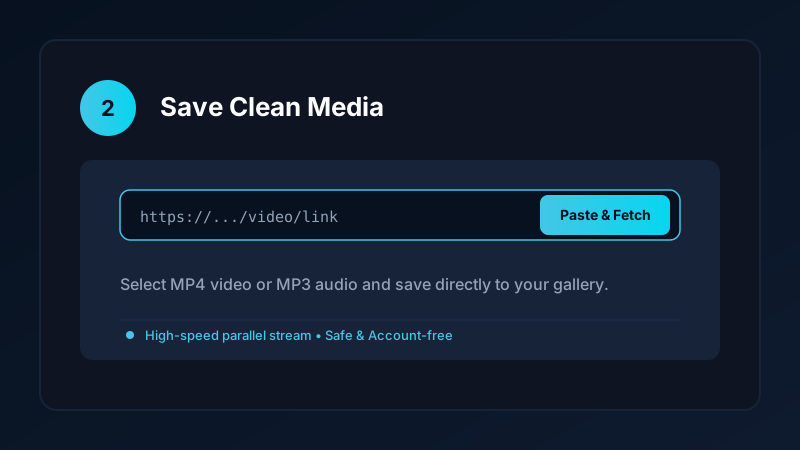
Transitioning to Save Downloads takes less than two minutes:
- Visit
savedownloads.comin your mobile web browser. - Download the official APK package.
- Verify the published SHA-256 checksum to guarantee file authenticity.
- Tap Install and begin downloading clean, high-definition media immediately.
Check our safe APK installation guide for detailed instructions.
Ethical and Fair-Use Guidelines
When downloading media:
- Save content solely for personal offline viewing, research, or fair-use study.
- Respect creator copyright and original publisher licenses.
- Read our comprehensive legal guide on video downloading.
Why Clutter-Free Utilities Protect Your Device Performance
Installing apps loaded with extraneous features impacts long-term phone health:
- RAM and Memory Overhead: Running secondary app stores, news aggregators, and game portals in the background consumes valuable system RAM, slowing down switching between daily apps.
- Thermal Performance: Persistent background networking warms up your phone processor, causing thermal throttling during gaming or high-definition video playback.
- Clean Architecture: Save Downloads operates exclusively when you want it to download media, exiting background processes cleanly once tasks are complete.
- Zero Lock-Screen Advertisements: Unlike ad-heavy downloaders that hijack your lock screen with sponsored wallpapers, Save Downloads keeps your device lock screen clean and untouched.
- Minimal Application Footprint: The entire Save Downloads APK package installs in seconds with a lightweight storage footprint under 15 megabytes.
Frequently Asked Questions
Why do users look for a Snaptube alternative?
Users search for alternatives because Snaptube contains aggressive push advertisements, third-party app promotions, and heavy battery usage.
Does Save Downloads require personal accounts like Snaptube?
No. Save Downloads operates 100% account-free without requiring sign-ins, social logins, or phone numbers.
Can I convert videos to MP3 using Save Downloads?
Yes. Save Downloads extracts studio-quality 320kbps MP3 audio from video links with a single tap.
Is Save Downloads free to use?
Yes. Save Downloads is completely free with zero subscription fees or hidden paywalls.
Ultra-Fast VPN & Uncapped Bandwidth
Protect your mobile downloads with military-grade AES-256 encryption. Prevent ISP bandwidth throttling and stream up to 8x faster.
Try Save Downloads for Android
Parallel multi-chunk downloads, lossless 1080p and 4K stream remuxing, WhatsApp status saver, and AES-256 encrypted vault. 100% offline and account-free.
Related Guides & Articles
Internet Download Manager (IDM) Alternative for Android and PC
Looking for an Internet Download Manager (IDM) alternative for Android and PC? Discover lightweight, free download managers with multi-thread speed and resume support.
TubeMate Alternative for Downloading YouTube Videos
Looking for a modern TubeMate alternative? Compare TubeMate legacy interface and codec requirements with Save Downloads for fast, seamless HD saving.
Vidmate Alternative: A Safe Video Downloader for Android
Looking for a safe Vidmate alternative? Compare Vidmate features, ad clutter, and privacy with Save Downloads for fast, account-free offline downloading.